
generationProspecting
Follow targeting into the campaigns that use it.
See who you’re targeting.
Map locations, industries, job titles, audiences and exclusions to your campaigns. Follow shared targeting across the account.
Understand campaign health, explore your audiences and see what deserves attention. All in one workspace.
Look deeper into audiences, ad tests, budgets and recent changes.
Audiences, pacing and testingPlan, review and act in phasesix.ai or your preferred AI tool.
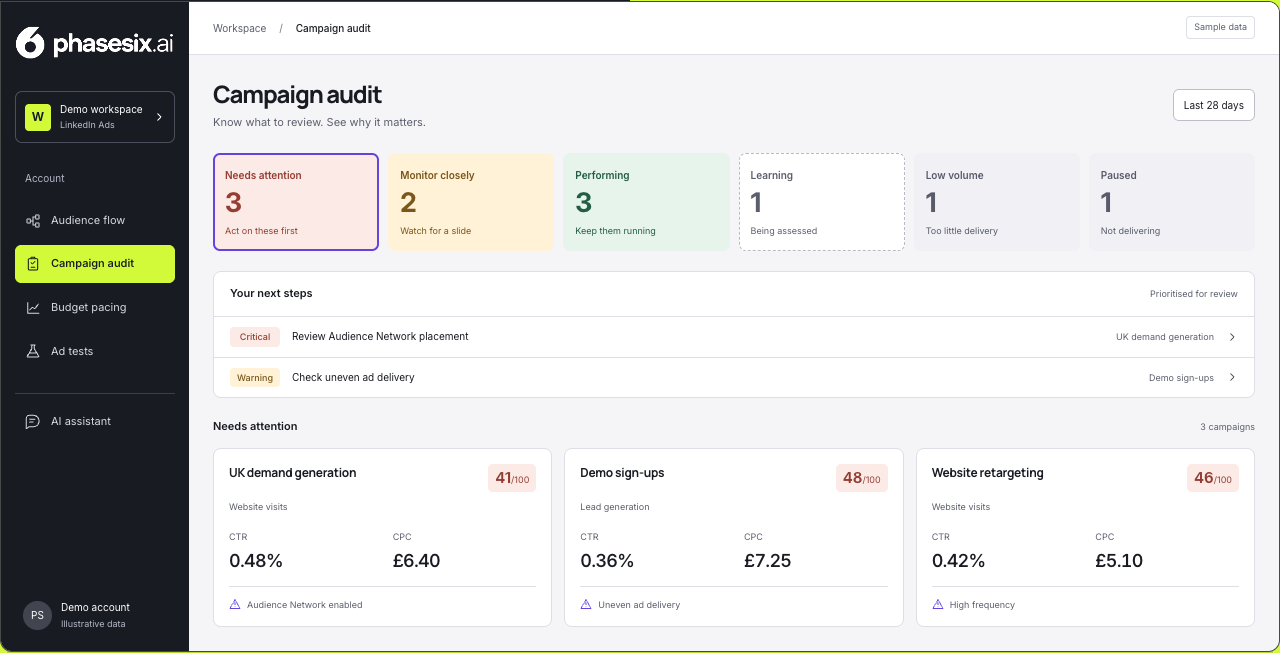
Your AI and the workflowA campaign can look busy and still need work. Phasesix scores campaign and ad performance, then gives you a prioritised list of what to review.
Check whether this placement fits your campaign goals.
UK demand generationCreative A received 92% of campaign impressions.
Demo sign-upsReview creative freshness and audience reach.
Website retargetingExplore campaign structure, targeting and remarketing connections in one place.
Follow targeting into the campaigns that use it.
Map locations, industries, job titles, audiences and exclusions to your campaigns. Follow shared targeting across the account.
See where your retargeting audiences are used.
See which campaigns target each retargeting audience. Trace the connections and review how your remarketing is set up.
*Illustrative projection at £320/day. Forecasts change with delivery.
See whether budgets are running ahead, falling behind or running out too early. Give each account—or a group of campaigns—a clear spending target.
Pacing provides recommendations. You decide what to change.
Compare your ads within a campaign, then see how the same creative performs across different audiences.
Review copy variations that share a visual, or creative variations that share the same copy. Compare performance within the campaign.
| Campaign / audience | Avg. dwell | CTR |
|---|---|---|
| Marketing directorsHighest dwell | 3.8s | 1.20% |
| Founders | 2.6s | 0.86% |
| Operations leaders | 1.9s | 0.65% |
Average dwell shows how long people spend with the ad.
Compare the same creative across campaigns with different audiences. Use dwell time and click-through rate to understand where it gets more attention.
Connect your AI to phasesix.ai over MCP. It reads the audit, the pacing and the account, comes back with the optimisations it can make, and applies the ones you pick through your own LinkedIn connection. It can build whole campaigns the same way.
How can I help you today?
Campaign groups, campaigns, targeting, creatives, document ads and lead forms, from a conversation.
Budgets, bids, ad rotation, pausing, targeting and audience changes, every one recorded in the change log.
The audit’s scores and next steps, budget pacing and bid estimates come with the tools, so your AI works from the account’s numbers.
Illustrative example, played at reading pace. Available actions depend on your role and LinkedIn permissions. You control account access and whether your AI can read data or make changes.
Research competitors, plan campaigns and handle the repeat work around your ads.
Search the LinkedIn Ad Library, save useful ads and monitor competitors in a library your team shares.
Map campaign structures on a visual canvas. Import existing campaigns, save versions and share the plan for review.
Apply audiences across selected campaigns or a lead form across selected ads. Review the scope before making changes.
Connect the account you work on. Bring your team in. Start with what needs your attention.
Get in touchGet in touch and we’ll set up your organisation. Then invite the people who manage your campaigns.
Choose the ad accounts you can access. The initial sync brings your account data into phasesix.ai.
Review your audit, set budget targets and explore the detail. Work in phasesix.ai or connect your preferred AI through MCP.
Move between client accounts, prioritise the work and bring the reasoning into your next client conversation.
Get a clearer view of the account you live in. Connect day-to-day decisions with the creative and spend behind them.
Have something else in mind?
Talk to the team.
Phasesix brings together LinkedIn campaign audits, performance drilldowns, audience and remarketing maps, budget pacing, ad and audience tests, and campaign planning. Connect Claude, ChatGPT and other compatible AI tools through MCP to investigate the account and carry out supported actions.
No. When you connect an AI tool, you choose read-only access or allow supported changes, and that tool controls its own confirmations. Actions also depend on your workspace role, your LinkedIn connection and account permissions.
The pacing views monitor spend, estimate where you’re heading and recommend a daily pace. Setting a target or creating a pacer does not automatically change your LinkedIn campaign budgets.
Yes. You can work with multiple connected ad accounts in your organisation, subject to the accounts and permissions available to your LinkedIn connection. Switch accounts to see the relevant audits, pacing and analysis.
Yes. Connect phasesix.ai through MCP to bring your account data and supported actions into Claude, ChatGPT or another compatible AI tool. MCP is the connection that lets your AI use phasesix’s tools. Choose whether it can reach every ad account in your organisation or just one, and whether it can read data or make changes. Custom connections must be available in your AI tool’s plan and workspace settings.
phasesix.ai is by invitation only. Email sales@phasesix.ai and we’ll set up your organisation and invite you. Then connect LinkedIn and choose an ad account. Once the account sync is complete, you can explore the structure and review its audit.
Tell us about your account and we will set up your workspace. Accounts are by invitation, so this is the way in.
Prefer email? sales@phasesix.ai